How to do ambitious things with AI (parent friendly)
Most people still use AI like Google. A step-by-step guide for anyone, young or old, to start getting real work done with a $20 ChatGPT or Claude subscription.

Most people use AI like it's Google: type a question, read the answer, done. They have no idea how much real (serious, ambitious) work it can actually do for them.
Andrej Karpathy recently put rough numbers on it: around 6 billion people have barely come in contact with AI at all, another 1 to 2 billion use free chatbots a bit like a better Google search, and only about 20 million (0.2% of the world) have seen first-hand what the latest agents can actually do, most of them programmers. This blog is about getting you out of that second group. (If you don't know who he is, Andrej Karpathy is one of the founding members of OpenAI, and he led the AI behind Tesla's self-driving cars.)
…this gap in shared understanding of LLM capability is widening.
My friends, colleagues, and even a few investors have asked me to teach them how to use AI properly, I try my best, but limited by how much time I can spend personally with them. I had my whole family onboarded onto Instinct, and I saw them in real time have a spark of the future.
Meanwhile, my dad sent me a link to a $$$ course to "learn agentic AI for architecture". I'm sure grifters have come up with something different for each field. The fact is, you can do practically everything you want with a $20 ChatGPT or Claude subscription and the app that comes with it and completely figure it out yourself (I think of it like learning how to use a computer, I'm sure there were some people who actually went to a 'computer class' but most of us just got a hang of it on our own). AI is the exact same, you do not need a class for it, you do not need a "special computer", you can just get started.
This blog is an attempt at getting anyone young-or-old, employee-or-business owner, get immediately started with agentic AI (AI that actually does things for you, not just answers), and meant to be something you can forward to your parents/colleagues/children to ensure they don't get left behind in embracing this life changing technology.
If you know how to code, this blog is not meant for you. There are intricacies, security considerations, local LLMs and many other things I'm deliberately ignoring here. You'll know how they work, but they don't matter to someone who just wants an outcome today.
What people get wrong about AI
Before we set anything up, let me clear up six things I hear all the time (usually right before someone decides AI isn't for them).
| Misconception | Reality |
|---|---|
| "Codex and Claude Code are for programmers." | They have "code" in the name because developers were the first people using them, but they're really an AI that can take actions on your computer, and you talk to them in plain English. If a task needs code, they write and run it on their own (the same way you use Excel every day without any idea how it was programmed). Some of the most useful things I do with them, like turning a folder full of invoices into one clean spreadsheet, involve zero code on my end. |
| "I need a specialized AI tool for my kind of work." | You almost never do. Nobody buys one computer for their finance work, another for sales and another for legal. You use the same one for editing Word documents, sending emails, building financial projections and posting online, and AI is the exact same: one general agent, your files, and a few skills (more on those later). |
| "AI hallucinates a lot." | A lot of people's opinions on this are based on models from 1 or maybe even 2 years ago, which could only answer from memory, so when they didn't know something, they'd make up an answer and say it with full confidence. The models from the past 6 months are extremely good, and when the agent is working on your real data, your actual spreadsheets and documents, a hallucination is a rare exception. Honestly, when it comes to making something up, you can trust the agent more than a human. |
| "AI is all slop." | You've probably seen articles online that are so obviously AI-generated. By default, the AI gives you what it feels is the average answer, so if you put in no effort, slop is what you get. Give it examples of the way you write and what you consider good, iterate on what it gives back, and you'll get exactly what you want. It's also a one-time thing. I have one set up that writes emails the way I used to write mine, and there's no reason for me to not trust it. |
| "It's not reliable, it'll mess things up." | At first it will mess up, same as any new hire, but there's always a reason behind it, usually some context it was missing. You find that, you fix it, and you move on. Improving your skills based on that feedback is how you'd onboard anyone onto your work, and it's how you get an agent aligned with your taste, your way of working and your style. That's when it becomes reliable. |
| "The work I do cannot be done by AI." | Whatever you think makes your work special (your judgment, your taste, the craft you've spent years on), most likely it can 100% be done by AI today. |
Okay, what can you do with AI?
People ask me all the time, "Can I do this workflow with AI?" or "Can AI take me from A to B?" Unless it involves physically moving something, the answer is almost always yes. It's just about prompting it well, setting up its environment correctly (like your AGENTS.md file, more on that below), and iterating on whatever it gets wrong until you reach the outcome you want.
Some ambitious (and slightly crazy) examples, whether you run the business or do the work yourself:
Light shows on buildings
Design and simulate the show before it ever goes up, and make it different every single day based on things like the weather, the date or what's happening in the city. Whoever runs the light show on the Burj Khalifa could have something completely unique on it, not just every night, but every hour.
Architects and designers
Turn your sketches into CAD files and 3D models, then make them 3D-printable so you can put a physical model on the table at your next presentation. Turning a 3D model into something printable used to be its own complicated process.
Music producers
Take a track you've already made and try it in styles you've never worked in: new genres, new beats, new arrangements, and keep iterating from there.
Salespeople
Be your entire sales cockpit. It finds the right people on LinkedIn, drafts outreach that you personalise and send with your own human touch, and tracks every lead in a custom dashboard built around how you work, instead of whatever you were doing in Salesforce.
Creators and small brands
Run your entire social media presence: come up with and write the posts, edit the videos, schedule everything, and keep up with your brand partners.
Accountants and finance
Run the operations of a financial accountant: work in Tally (or whatever accounting software you use), raise and track invoices, figure out billing issues, and coordinate with government departments.
Anyone signing contracts
Most people have already had AI review a contract. The bigger move is having it redline every incoming agreement against your own terms: it knows your positions, marks up everything that deviates, suggests fallback language, and hands you a tracked-changes version ready to send back.
Your health
Be your personal health assistant. This is one I use myself (maybe I'll write about it later): mine is connected to my Whoop, my meal service and my BCA (body composition) scanner, so it has live data on my health all the time, and I can ask it anything and program my fitness accordingly.
The basics
You don't need to understand how AI works to use it (most of us have no idea how our computers work either, and we use them all day), but five ideas will make everything after this make a lot more sense. The short version: model + harness = agent, and agent + skills + a schedule + its own channel = an always-on agent.
Models, harnesses, agents, tokens, and cloud vs local
What a model is
ChatGPT and Claude run on what's called a large language model. It's been trained on an enormous amount of text (think a good chunk of the internet), and it learned to predict what comes next so well that it can reason, write and follow instructions.
The way I'd explain it to my parents: a model on its own is a brain in a jar. It can think, but it can't touch anything. GPT-6 Sol and Opus 5.5 are models, and they run in a data center.
What a harness is
The harness is the body around that brain, everything built around the model that lets it actually get work done: the app you type into, the tools it can use (reading and editing files, browsing, running things on your computer), the permissions you give it, your projects and skills, and the loop that keeps it working on a task until it's finished. The ChatGPT desktop app (with Codex inside) and the Claude desktop app (with Claude Code) are both harnesses. That's a big part of why I recommend these two: the companies build the model and the harness together, so they work extremely well with each other.
What an agent is
Put the two together and you get an agent: model + harness, a brain with hands. It can reach your files, your browser and your email, and run programs on your computer, like a very capable colleague sitting next to you doing the tasks you hand it. That's what you'll set up in this guide. The same model on the website, without a proper harness, is just a chatbot. And once your agent has skills and a schedule, you can turn it into an always-on agent that works on its own (more on that at the end).
Tokens
AI doesn't read words, it reads tokens, which are small chunks of text (roughly, a token is about three quarters of a word).
Everything costs tokens: the messages you send, the files it reads, the answers it writes, and that's what your subscription is actually measuring. In practice this means two things. Huge files and very long chats burn through your limits faster. And each chat can only hold so much at once (that's called the context window), so when a chat gets really long it starts forgetting the early parts, a bit like a meeting that's been going on for three hours. When you start a new task, start a new chat.
Cloud vs local
The AI model itself runs in the cloud, on OpenAI's or Anthropic's servers. The app runs locally, on your computer. So the thinking happens in a data center, but every action it takes, like opening a file, clicking a button or running something, happens on your own computer (the brain is in the cloud, the hands are on your machine). The app is the bridge between the two, which is exactly why you'll want the desktop app and not the website (more on that in the setup). It's a bit like your email, which lives on Google's or Microsoft's servers, but you read it, write it and attach files to it from your own computer.
It also means whatever the AI reads gets sent to the provider. Coming from security, I'd do one thing here: go to data controls in settings and turn off the option that lets them train on your chats (if you don't want that). And if something is genuinely sensitive, check your company's policy before you put it in.
You might also hear about "local models", which run entirely on your laptop. They exist, but they're a lot weaker than the cloud ones and need a powerful machine, so for everyday work you can skip them.
Do this exactly
- Do this on a laptop or desktop. Open up your laptop or desktop computer, not your phone. We're doing serious work here, and this can't be done on a phone (later on, you can try doing some things from your phone too).
- Download the desktop app, not the website. Get the ChatGPT desktop app on your computer (Claude's desktop app works exactly the same way, if you'd rather use that). The website can only chat with you. The app can actually work on your computer: it can open your folders, read and edit your files, use your browser, and run things for you (which is pretty much everything in this guide). It's the difference between calling someone for advice and having them sit at your desk and do it with you.
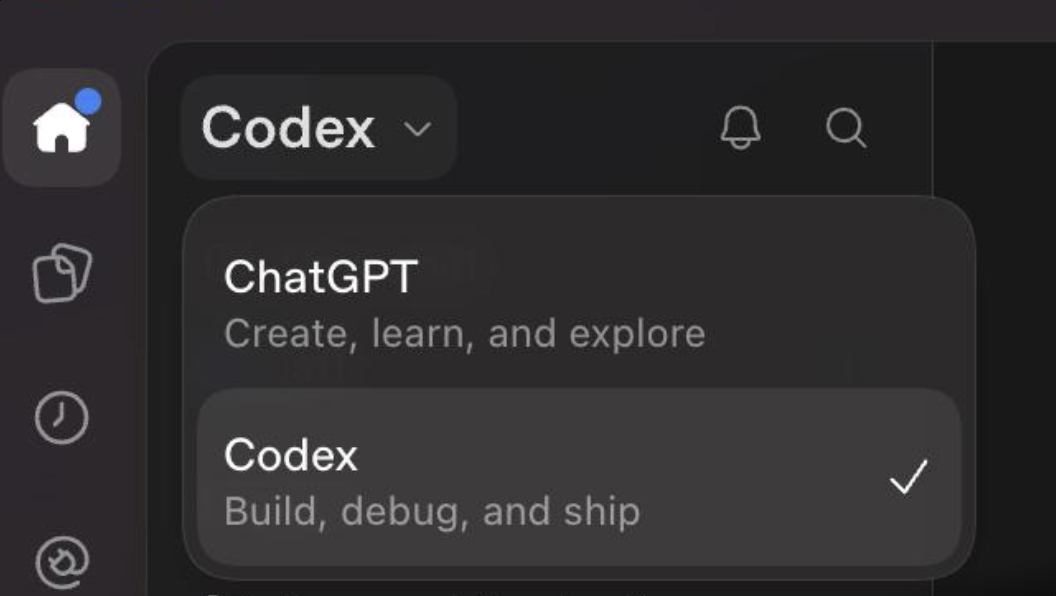
- Always use the code side. Both apps have a normal chat side and a code side. In ChatGPT, pick Codex from the menu in the top left. In Claude, switch to Code with the toggle. Always work there, even if you never touch code: that's the side where the AI can actually work on your computer, with your files, apps and permissions. The chat side is just the chatbot.
- Buy the $20 plan. The free version doesn't give you access to any useful agentic capabilities. Start with $20, that can be your starting budget. If you use it properly, you will get orders of magnitude higher return out of this than you invest, and you'll invest more yourself as you see the value out of it. To be clear, this isn't a sales pitch for ChatGPT or Claude. It's just that both of them have the most advanced models in the world, and the harnesses (the apps) they've designed are extremely good and work well with those models, which is why these are your two options today.
- Talk to it, don't type. Consider purchasing and installing Wispr Flow, or just use ChatGPT's voice option. I've been typing my whole life and I'm at around 120 WPM, but it still constrains the flow of thought in your mind. AI is very good at understanding what you're saying, so I often blabber about a task for 10 minutes and just send it to the agent, which actually works really well. You get to explain everything freely and naturally, and it picks up exactly what you want.
- Turn on computer use. This lets it see your screen and click and type in other apps the way you would, so it can work directly in software that has no connection to AI at all, like Photoshop or whatever legacy tool your work still runs on. It's slower than its other tools, but it gets into apps it otherwise couldn't. (You can often also ask the AI to write an integration for that tool so it can talk to it directly instead of using computer use. That's usually not very hard, it might take 5 minutes, and you only have to do it once per tool.) You can enable it in the settings.
- Connect your apps. Gmail, Google Calendar, Drive, Slack, Notion, whatever you use every day. Every connection is one less thing you have to copy and paste into it.
- Make a project for your work. Think of a project as a workspace, like a folder on your desktop. Let's say you define everything about your company in one project. You open one chat for a sales task, like a proposal for a customer, and then another for a marketing task, and both already know you're working on this company, so you're not re-explaining who you are and what you do every single time. I keep separate ones for BugBase sales, finance, legal and my personal stuff. Any new chat you start in a project has the overall context of:
- the folders in the project
- what was going on
- a brief chat history
- a bit of memory
- any other relevant files connected to it
- whatever is written in your AGENTS.md file, and this is the one to get right. It's a plain text file where you describe who you are, what you do and how you like things done. Build a strong one and keep maintaining it, so you never have to explain who you are in a chat again. If you have a company, write one for the whole company and send it to all your employees, so everyone's chats start with the same shared company context.
- Understand the different types of models. There are a bunch of models to pick from, and most of them also come with thinking levels (how long they think before they answer). The logic is simple: go smarter than the basic one, but not the smartest in the world, that's just overkill. You're not solving cancer with the work you're doing (if you are, sure, go all out). In my opinion, GPT-6 Sol and Opus 5.5 on medium or high work extremely well today, out of the box, for any task in existence. Lower models may sometimes work and are slightly cheaper and faster, but their intelligence isn't guaranteed, so I just don't use them, and I still get most of my work done.
- Give it full permissions. Out of the box, it asks you before every single tool call, every file it opens and every command it runs (imagine an assistant who checks with you before opening every single email). These tool calls are very technical, and if you're non-technical you won't really be able to tell whether it's doing what you want anyway, so all the prompts do is slow you down. Put it on full, complete access. It will warn you that this is dangerous, and that's totally okay. The models are really good, and the chance of them doing something bad is so low that I haven't seen it happen to me with the latest models. If you're worried about it making a payment or deleting something, those approvals are different from tool permissions. The people building these models and apps are aware of that and have built it into the training, the system instructions and the apps themselves, so it stops and asks for your approval in exactly those situations.
- Turn on fast mode, and be patient. I noticed many of the folks I introduced to agentic AI weren't very comfortable with the fact that some tasks take a lot more time than a regular chat, often up to an hour. This is normal, and expected. Agentic AI consumes an order of magnitude more tokens than a normal ChatGPT session, and the GPUs are split amongst all their users (with dedicated GPUs you'd get very fast inference), so it ends up slightly slower. It's also doing tool calls, which means it's actually interacting with your computer: things are loading, it's looking at the output, validating it, thinking about it, and that takes time. You have to accept that. You can turn on fast mode to speed things up, but it will eat through your usage quicker. I keep fast mode on all the time.
- Give it something real to work on. Now you have a setup that's ready to take on any work in the world, and there are some ideas below. Be as creative as you can and give it the most ambitious task you can think of. There's a running joke in the tech community, "Make me $1 million, don't make any mistakes," and one day even that might be possible. Until then, start with smaller tasks you can see being doable. As you see those working well, abstract them into skills, build on top of them, and keep scaling up as you go.

Don't do this
- Don't get distracted by the code. While it works, you'll often see diffs (red and green blocks showing what changed in a file), code or other technical stuff popping up on the screen. Ignore all of it entirely. It doesn't matter for you, and it's fine, you can just continue.
- Don't lose track of what you're spending. Your plan is counted in usage windows (a short one that resets every few hours, plus a weekly cap), and you can see where you stand in settings.
- Don't trust anything you download from the internet. That includes skills, prompts, and anyone claiming they've "reverse-engineered" something for you. Any of it can carry malware, and with agents even a plain text file can be dangerous: it can hide instructions telling your agent to do something harmful, and the agent will follow them. Unless you've read it line by line, don't use it. Honestly, you don't need to. Apart from a rare few, nothing I've found online has been useful to me, while the skills I've written myself have been extremely useful.
- Don't move your agent to the cloud. OpenAI has recently been loudly pushing dots, always-on agents that live on a computer in OpenAI's data center instead of yours. I'd skip it. Most people already have a laptop, and I don't see everyone getting a second computer in the cloud anytime soon. More importantly, your files, your daily work and your connections are all on your own computer, and a lot of companies require your data to stay there. You know how reliable your machine is and how you back it up, so keep your agent working there. Maybe one day that changes.
Try these today
If you're not sure where to start, here are seven things you can paste in during your first hour, going from simple to a little crazy:
- "Here are photos of my receipts from this month. Put them in a spreadsheet with date, vendor, amount and category, and total it by category."
- "Plan a 10-day trip to Japan for my family of four. Give me a day-by-day itinerary, a budget in a spreadsheet, and a map with every place we're going."
- "Here are my bank statements from the last six months. Build me a dashboard of where my money actually goes, and tell me what I could cut."
- "Here's a voice note of me rambling about a business idea. Turn it into a 10-slide pitch deck and a list of the first ten things I should do."
- "Here's a recording of my talk. Cut it into five 60-second clips with captions, ready for Instagram."
- "Design a phone stand with my name on it, and give me a file I can send straight to a 3D printer."
- "Make a little game I can play with my kids about their favourite thing, and open it so we can play right now."
You'll notice none of these are questions, they're all tasks, and a few of them are things you'd never have attempted on your own. That's the biggest shift I'd want you to make: stop asking AI things and start handing it work.
Skills
A skill is a set of written instructions that teaches the AI how you like a specific task done. It's just a text file called SKILL.md, basically the onboarding doc you'd give a new hire, except you write it once and from then on that task gets done your way every time.
You'll notice there are certain tasks the AI just isn't able to do well upfront. For me, one of those was handling my entire support ticketing system. I get support requests of all kinds, and early on it would sometimes reply to its own emails, among other mistakes. Those are extremely bad, and they happen because the AI was never trained on how your particular work runs.
Whenever it's not doing something right (which is often), or the task is an especially long or large workflow, your job is to write a skill, and then keep improving it as you go. I wrote a ticket triage skill, and every time it got something wrong, I added the exact instruction it was missing. I didn't rewrite it from scratch, I just kept iterating with it, and it ended up with lines like:
- "Before replying to any email, check who sent it. Never reply to your own emails."
- "First, check whether the email is spam. If it is, close the ticket as spam."
You don't even have to write these yourself. Do the task with the AI, correct it until it's right, then tell it to "turn what we just did into a skill," or "add this to the skill" when it slips up. Anywhere your knowledge goes beyond what the AI would do by default, which is a lot of places, it's your responsibility to build that skill. At BugBase, I have them for ticket triage, commercial proposals, contract reviews, monthly finance reports and customer security questionnaires.
Scheduled tasks (cron jobs)
Once a skill does its job well every time, the next step is putting it on a timer. Engineers have had cron jobs forever, which are just tasks that run on a timer (like a recurring reminder on your calendar, except the AI actually does the thing instead of just reminding you). Now you can set them up yourself, in plain English. Some simple ones:
- "Every weekday at 8am, go through my email and calendar and give me a one-page brief of my day."
- "Every Monday, pull last week's numbers from this sheet and draft the update for the team."
- "Every Friday, check these three competitors' websites and tell me what changed."
And then more complex ones, like:
- "Every weekday at 9am, do a full analysis of all our open support tickets and tell me where each one stands."
You don't even have to mention the skill. These apps are designed so all your skills stay available, and the AI automatically pulls in the relevant one (here, the ticket triage skill) whenever a task needs it.
Once you have a few of these running, a good chunk of your routine work happens without you having to kick it off.
Triggers (if this happens, do that)
Scheduled tasks don't have to be purely about time. You can also have something happen because something else happened. For example:
- "Every Monday, check my weight from my smart scale. If it's gone above 80 kg, tell me and adjust this week's meal plan."
- "Every morning, check the price of the flights I'm watching for our December holiday. If they drop below ₹30,000, message me right away."
Under the hood, it's usually still something running on a timer that checks a value, and the result decides whether the next thing happens. You don't need to understand any of that though, you just describe it in plain English: if this happens, do that.
Advanced: always-on agents
An always-on agent is the step after all of this. Up to now, you've been working with your agent, sitting next to it and handing it tasks. An always-on agent works for you: it runs whole parts of your work on its own, and you reach it the way you'd reach a person. Setting one up is still, unfortunately, slightly technical today, but it's very doable, and it works.
Go deeper into always-on agents
The advanced step is realizing you are the operator now, and you don't have to be in the chair for every single task.
Once you've refined a skill to the point where you're confident that just running it works well every time, you can hand that whole process off to an always-on agent. Let's say you want to put out a blog post every week, and your blog skill is always putting out really good drafts. It still needs your review once, but it's really good. That whole process (picking the topic, researching it, writing the draft in your voice, putting it in a doc for you to look at) can be delegated to it, and it runs on its own and only comes to you at the end.
The easiest way to think about an always-on agent is as another human being entirely, basically an AI employee. When you hire someone, you give them:
- a job to get done (the goal)
- an onboarding doc on how you like things done (the skills)
- access to the tools they need, and nothing more (the connections and permissions)
- a routine (the schedule)
- a way to reach them, like an email address or a phone number (the channel)
- a manager who reviews their work before it goes out (you)
An always-on agent is exactly that: your agent, plus skills, a schedule, a goal and its own channel, running without you sitting there.
The channel is the part that makes it feel like a person. Instead of opening an app every time, you make it available to you where you already are: you give it its own email address, or a way to talk to it over Telegram, WhatsApp or even iMessage. You message it the same way you'd message a colleague, forward it an email or a voice note from your phone, and it messages you back when it's done or when it's stuck. Instinct is one of the more popular always-on agents that came up recently (it's the one I got my whole family onto), and it's a good example of exactly this: something that works like a person you can just message.
And just like a real team, you can have more than one: one that preps your morning brief, one that drafts your weekly update for your team, one that finds unpaid invoices and drafts the reminders. Of the 8 I run, the morning brief is the one I'd start with, it's waiting for me every day before I've even opened my laptop.
The rule I'd stick to is the same one you'd use with a new employee. Start them on low-risk work, review everything at first, and only stop checking once they've earned it. Anything that moves money, signs something, or goes out under your name still comes to you first.
Setting one up. Running your own always-on agents means setting up something like OpenClaw or a Hermes agent, which is slightly more complicated and, unfortunately, still slightly technical today. It's still very doable, and it works, I have 8 of them running myself.
Between the two, Hermes agent is what I would strongly recommend you set up. OpenClaw feels unnecessarily sloppy to me today, but if you're completely non-technical, OpenClaw might be the way to go. And you don't have to figure out either one on your own: ask your agent in ChatGPT or Claude to set it up for you, or to teach you how it has to be set up and what all has to be configured, in very simple baby terms.
That's it
Think about how much learning to use a computer changed your work. Your finance, your sales, your legal, editing documents, sending emails, building projections, talking to people and posting online, practically everything you do runs through it now and nobody thinks twice about it. AI is that same shift happening all over again, and it's happening right now.
You do not need a $$$ course, you do not need a different tool for every problem, and you do not need a developer. Everything in here is already sitting inside a $20 app. Install it, spend 15 minutes setting it up, and give it something real to do today. And if this helped, forward it to someone who's still using AI like Google (your parents are a great place to start).
Two last notes
The interface may change in the future, like the ChatGPT UI today and 3 days back was different. They change it so frequently, similarly with Claude Code, but if you understand this, you will be able to understand every single thing that they add on top of it. In fact, you don't even need any additional features they add for this to be insanely life changing for you.
The day we have AGI-level models, all of this will stop mattering entirely. We're not there today, and until then, using AI is a massive productivity boost that exists right now. Everyone should be taking advantage of it, not just developers.